January 15, 2025
Wfuuz Tutorial
Introduction :
Many tools can craft HTTP requests and let users modify their contents — fuzzing follows the same principle. In fuzzing, you repeatedly send similar requests to a server while changing a specific part of the request. When that portion is substituted with values taken from a wordlist or directory, the process is called fuzzing. This guide shows how to use Wfuzz (Web Application Fuzzer), a popular open-source tool for web fuzzing. Since its release, Wfuzz has become a favorite among security researchers and bug bounty hunters for automating large numbers of customized HTTP requests. Let’s get started.
What is Wfuzz?
Wfuzz is a Python-based utility designed to fuzz web applications and HTTP services. It supports many options and filters, enabling you to replace parts of an HTTP request with the special token FUZZ. Wfuzz then iterates through a wordlist or payload set, substituting each value in turn and sending the modified requests — allowing you to discover hidden resources, parameters, or behaviors.
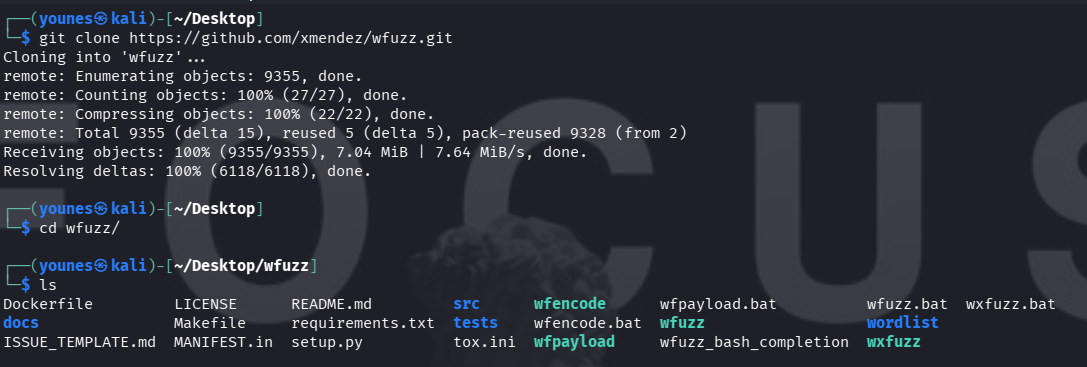
Installation (Setup)
Install from source (via Git) :
Viewing Wfuzz Help / Options
To display Wfuzz’s help and see all available options and usage examples, run either:
wfuzz -h # or wfuzz --help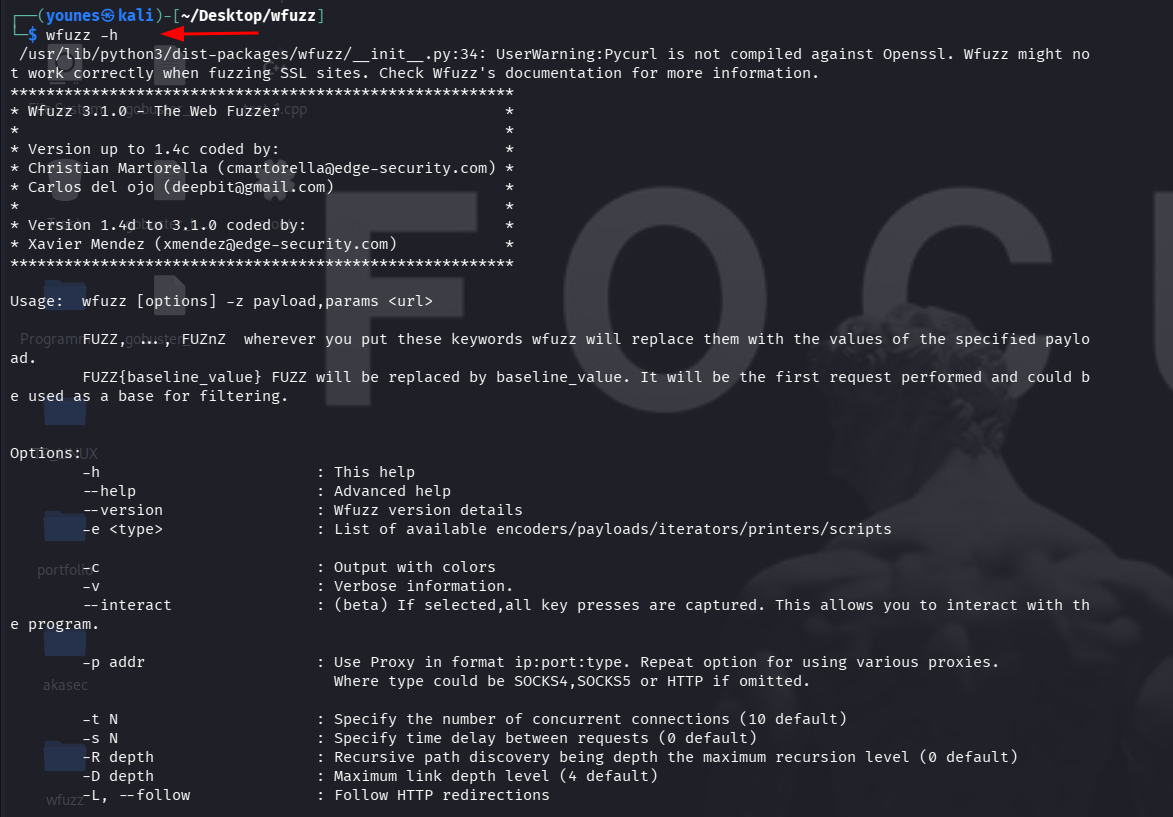
Modules (-z) — wfpayload and wfencode
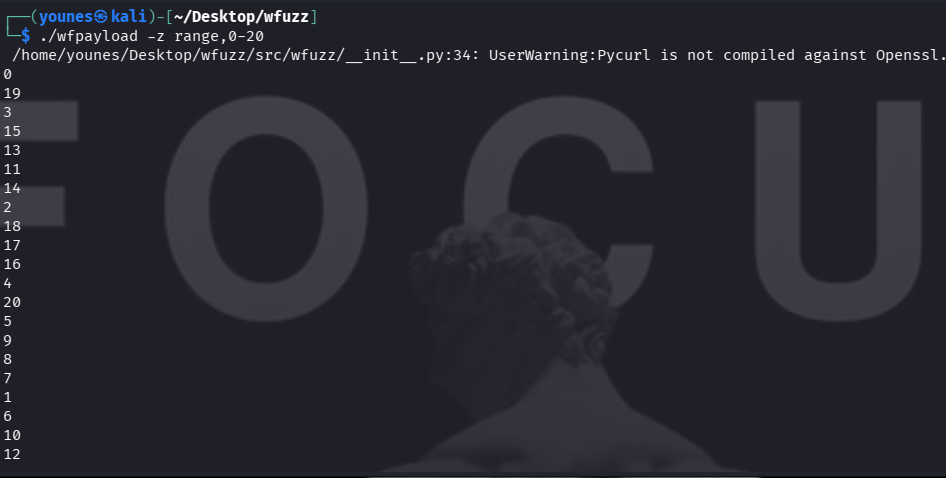
Wfuzz supports modules (specified with the -z option) to generate or transform payloads dynamically. When Wfuzz is installed from source, two helper executables are provided: wfpayload (payload generator) and wfencode (payload encoder/transformer). These tools may be used standalone or invoked by Wfuzz through -z.
wfpayload produces payload lists (ranges, numeric sequences, permutations, etc.), while wfencode applies encodings or transformations (URL encoding, Base64, custom encoders) to payloads. Use them whenever you need dynamic or programmatic payloads instead of static wordlists.
Fixing the Pycurl Error
Sometimes, when running Wfuzz, you may encounter a pycurl error. This can be resolved with the following steps:
# Remove the existing pycurl installation
•	sudo apt --purge remove python3-pycurl
# Install required development libraries
•	sudo apt install libcurl4-openssl-dev libssl-dev
# Reinstall pycurl via pip
•	pip3 install pycurl
Using wfencode to Encode Inputs
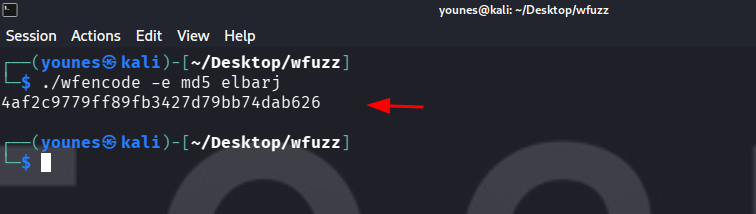
After fixing the pycurl error, you can use wfencode, a Wfuzz module that encodes a supplied input using a hash algorithm or other transformations.
Example — Encode a string using MD5
Payloads in Wfuzz
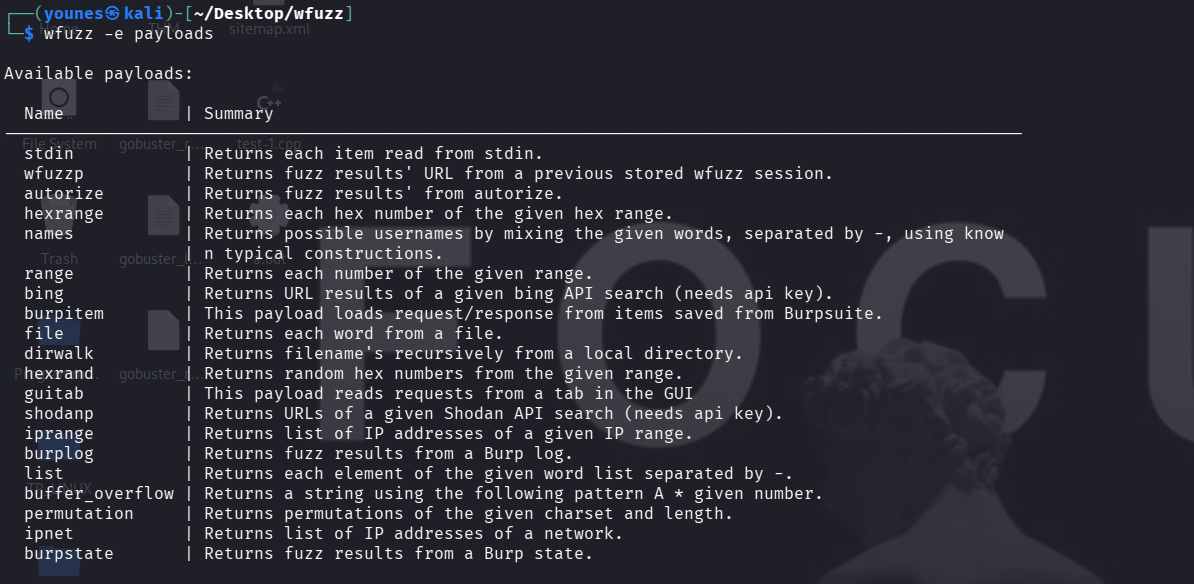
In Wfuzz, a payload is any source of input data that will replace the FUZZ marker in a request. Payloads can come from wordlists, numeric ranges, or generated patterns.
Listing Available Payloads
To see all built-in payload types supported by Wfuzz, run:
Detailed Module Help (slice filter)
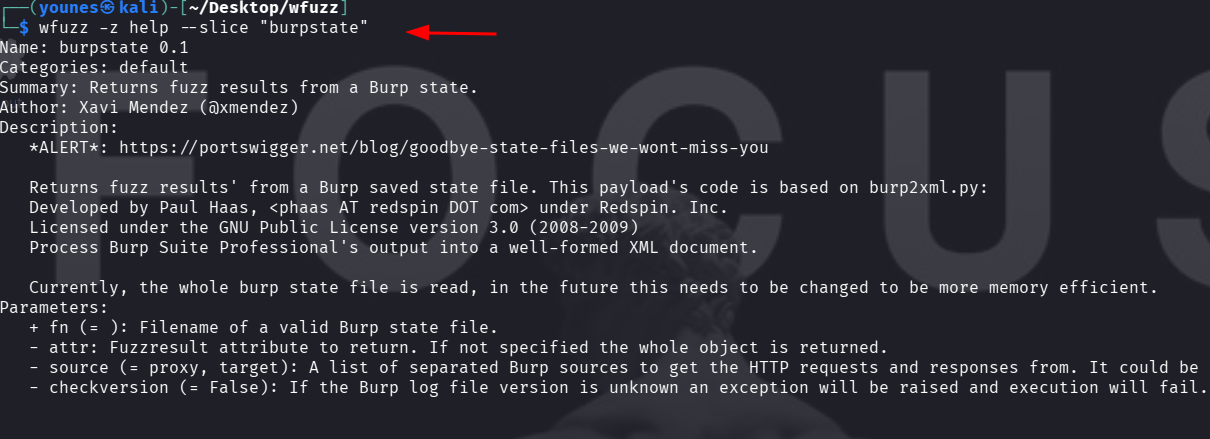
Wfuzz lets you inspect modules in more detail using the --slice filter with the -z help command. For example, to view the detailed list of modules in the burpstate category, run:
Subdomain Fuzzing
Subdomain discovery is very useful in penetration tests. Attackers frequently target subdomains (which may host different applications or functionality) instead of the main domain, so enumerating subdomains can reveal additional attack surfaces.
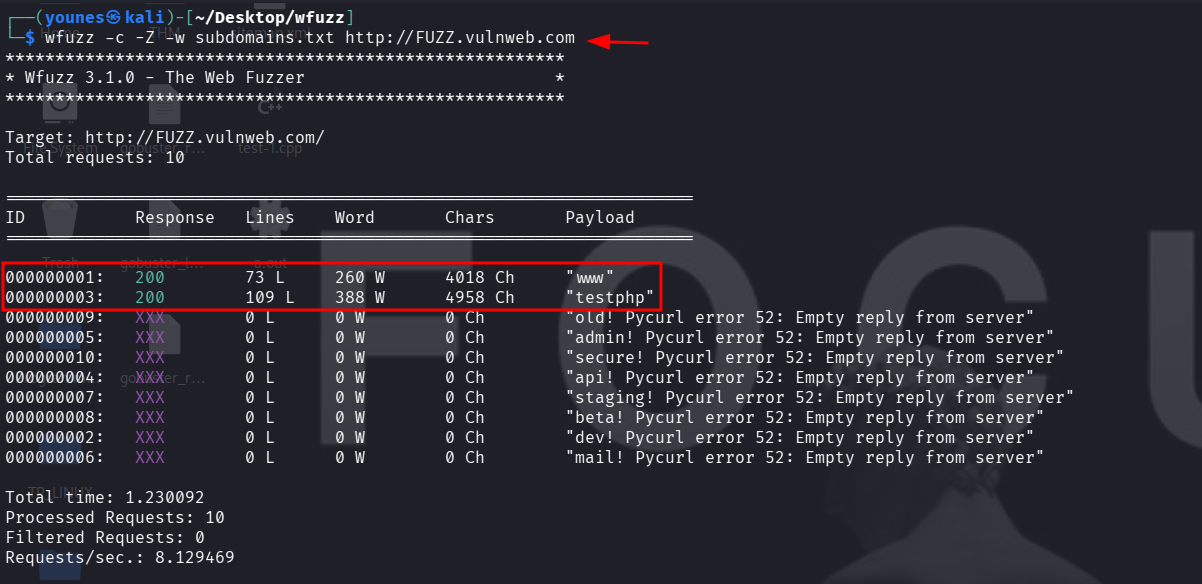
Example — brute force subdomains with Wfuzz
Flags explained
FUZZ — the marker that Wfuzz will replace with each entry from the wordlist (here used at the subdomain position).
-w subdomains.txt — specifies the wordlist containing candidate subdomain names.
-c — enables colorized output (makes HTTP status codes and results easier to scan visually).
-Z — runs Wfuzz in scan mode: it accepts a single target URL, continues through payloads, and ignores connection errors (useful when many payloads trigger timeouts or DNS failures).
Directory Fuzzing
Directories can be enumerated with Wfuzz in the same way as tools like Gobuster: supply a wordlist and replace the FUZZ marker in the URL with each word from the list.
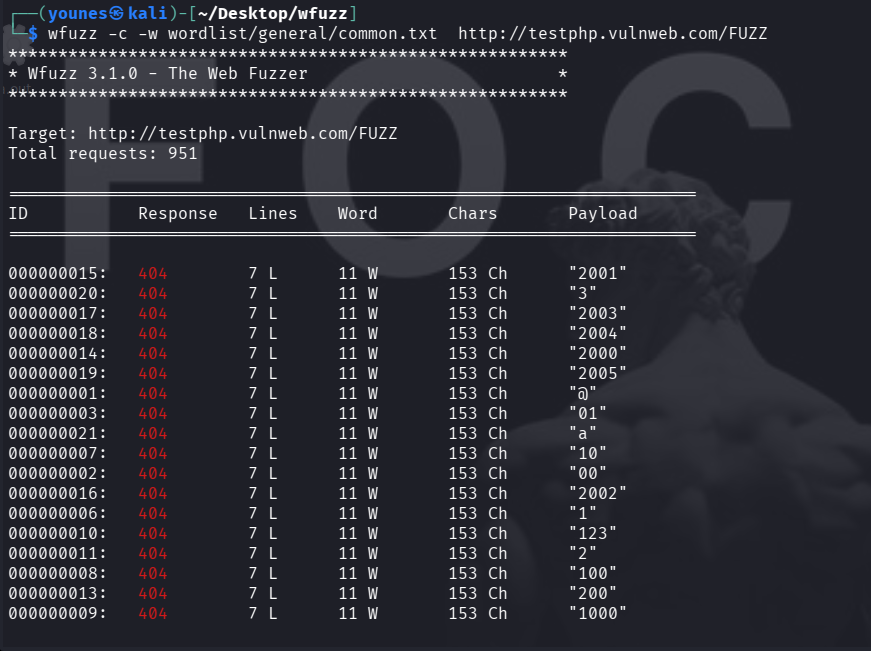
Filtering noisy results
The output often contains many 404 responses and other uninteresting results, which makes finding relevant findings tedious.
Wfuzz provides several show / hide filters to narrow results by HTTP status code, number of lines, number of words, or number of characters in the response.
Tip: apply filters early (small wordlist + filter) to reduce noise and speed up analysis.
Common filters
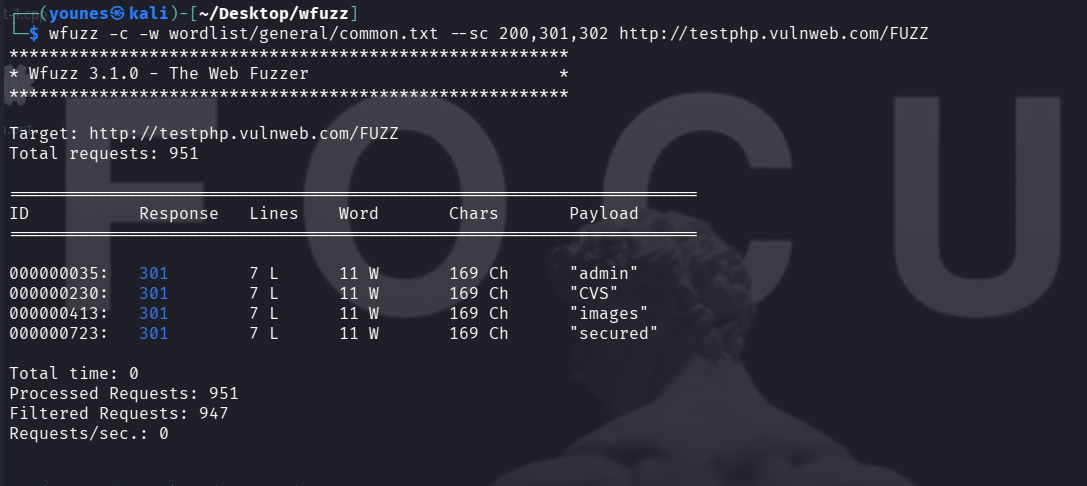
--hc <CODE>— hide responses with HTTP status code<CODE>.--sc <CODE>— show only responses with HTTP status code<CODE>.--hl <NUM>— hide responses that have exactly<NUM>lines.--sl <NUM>— show only responses that have exactly<NUM>lines.--hw <NUM>— hide responses that have exactly<NUM>words.--sw <NUM>— show only responses that have exactly<NUM>words.--ch <NUM>— hide responses by number of characters (use the char-based filters supported by your wfuzz version).
hide 404 responses :
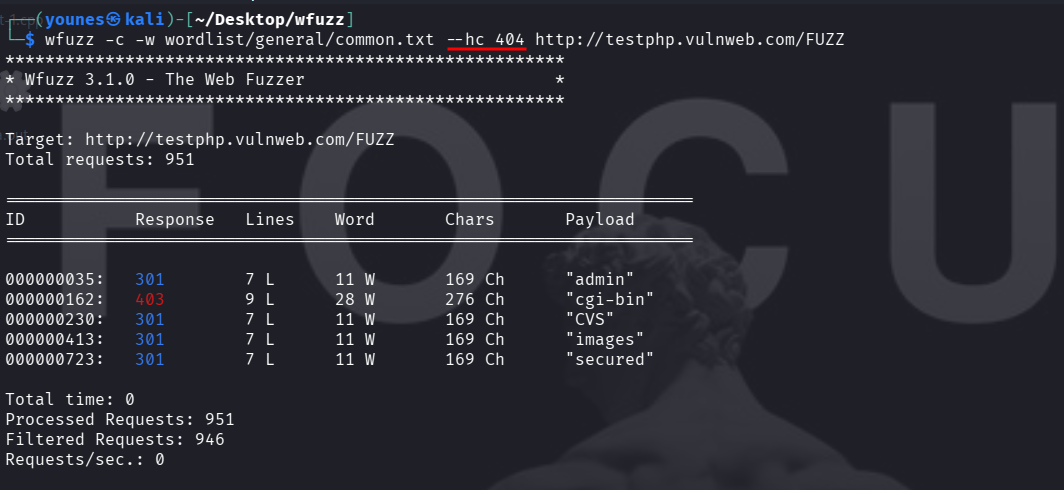
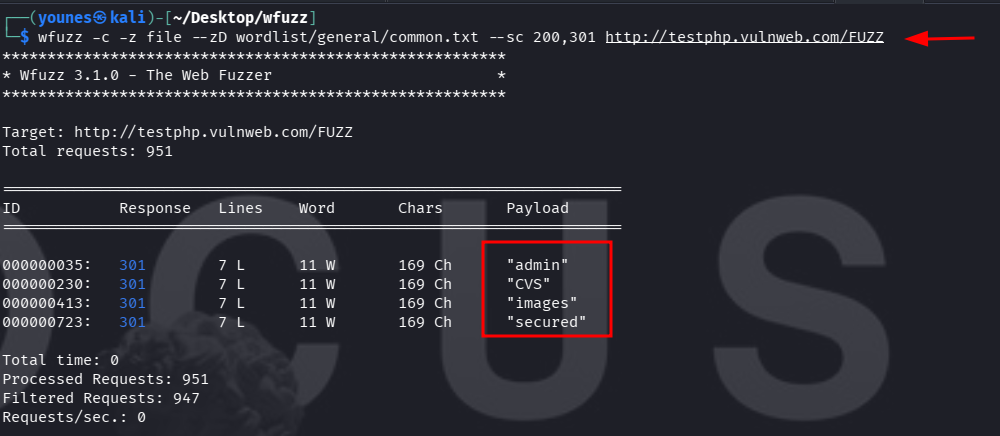
show only 200, 301 and 302 responses :
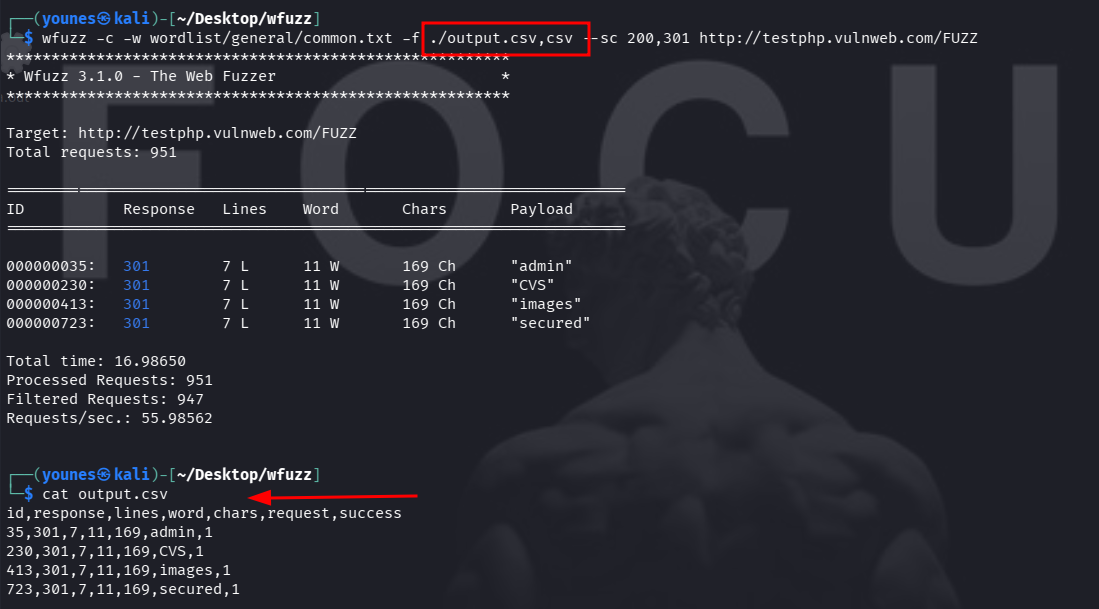
Saving Fuzzing Output
Wfuzz can save its results to a file using the -f option. The -f argument accepts a file path followed by a comma and the printer (output format) to use. Common printers include csv and json (check wfuzz --help for the full list available on your version).
Printers & Advanced Payload / Wordlist Filters
List available printers
To see the output printers supported by your Wfuzz installation (CSV, JSON, etc.), run:
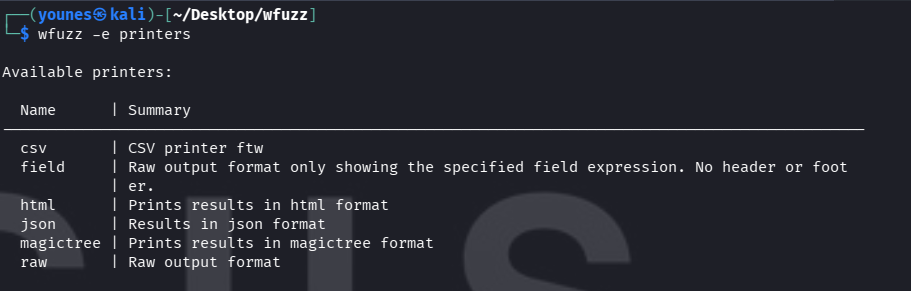
This lists the names you can use after -f (for example -f /tmp/out.csv,csv).
Advanced payload / wordlist sub-arguments
Wfuzz modules and payloads accept extra sub-arguments that let you tune payload generation or supply defaults. These are passed after -z (or used together with -w where appropriate):
--zP <params>— extra parameters for the specified payload module.--zD <default>— default parameter (commonly used to point a module at a wordlist file).--zE <encoder>— encoder to apply to the payloads (for exampleurlencode,base64, etc.).
Note: -w is the simple wordlist flag (point it at a file). Using -z file + --zD calls the file payload module explicitly and is useful when you want module-specific params or encoders.
Double (and Multiple) Fuzzing
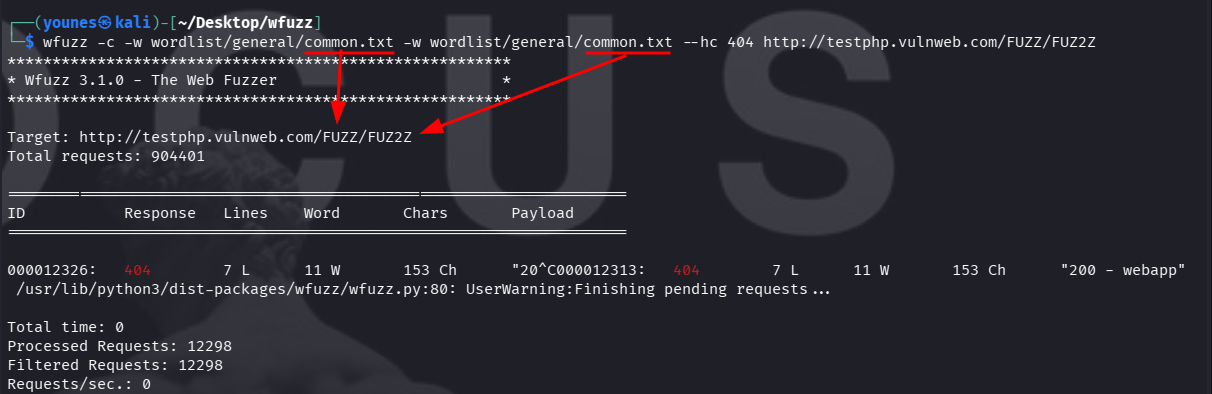
Wfuzz supports fuzzing multiple insertion points in the same request. Use different FUZZ markers to indicate each parameter position:
FUZZ — first payload position
FUZ2Z — second payload position
FUZ3Z — third payload position
FUZ4Z — fourth payload position …and so on.
Each -w (wordlist) parameter on the command line maps to a corresponding FUZZ marker in order.
The first -w supplies values for FUZZ.
The second -w supplies values for FUZ2Z.
The third -w supplies values for FUZ3Z, etc.
Example — URL/path double fuzzing
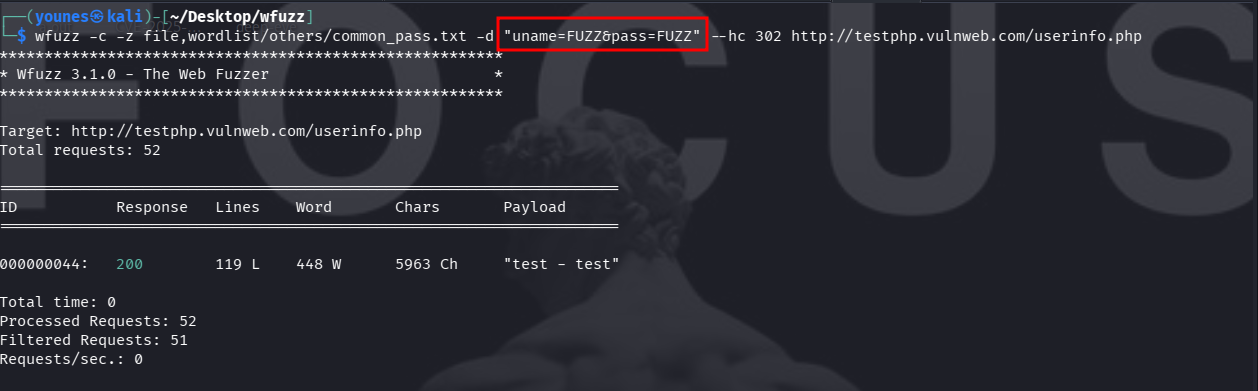
login bruteforce — same file for both fields
Use -d to specify the POST body. Here we use one wordlist for both uname and pass. In this run the server returns a redirect (HTTP 302) for valid credentials — you can filter by that code to spot successful logins:
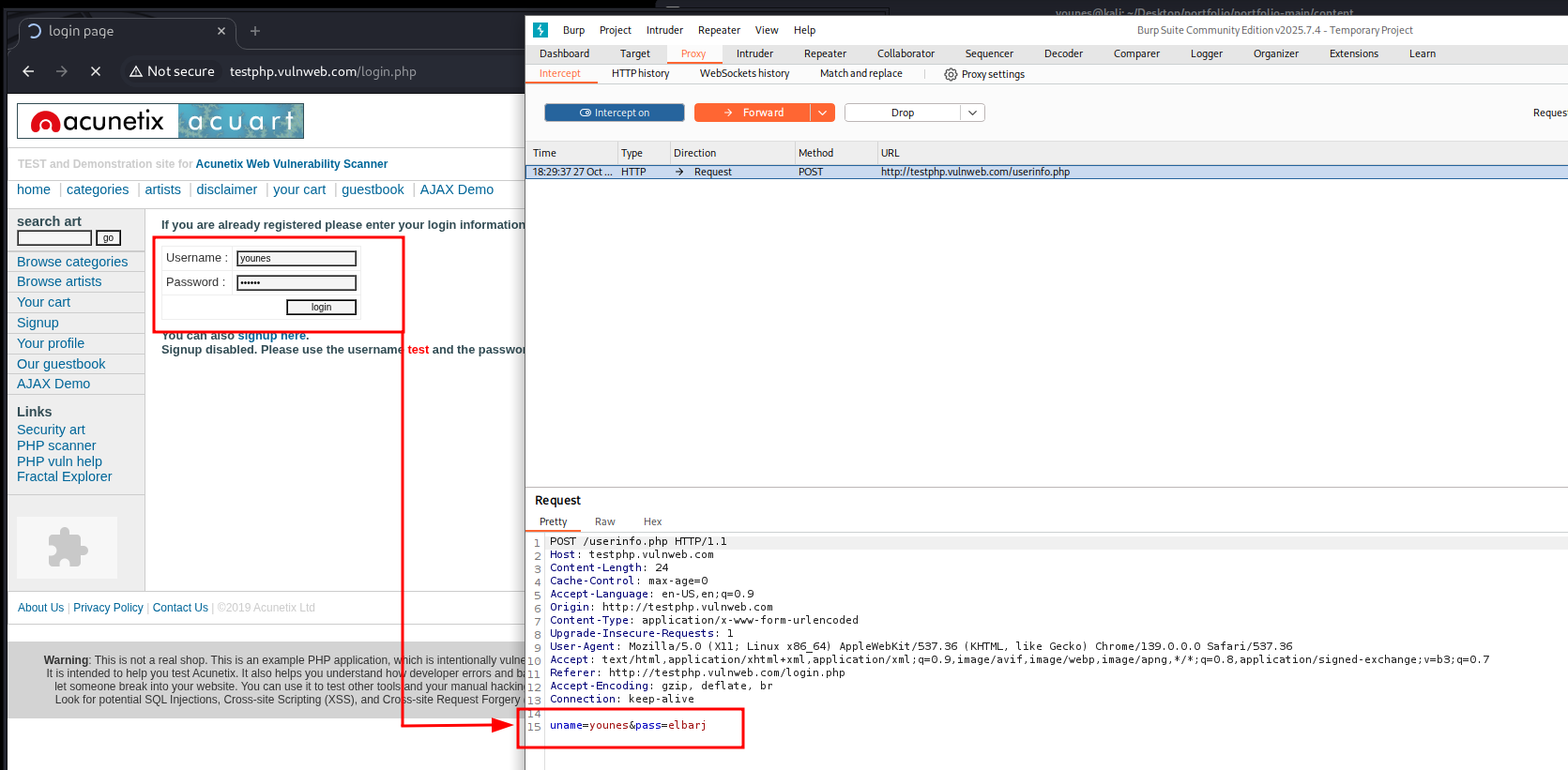
wfuzz -c -z file,wordlist/others/common_pass.txt \ -d "uname=FUZZ&pass=FUZZ" \ --hc 302 \ http://testphp.vulnweb.com/userinfo.php
Cookie Fuzzing
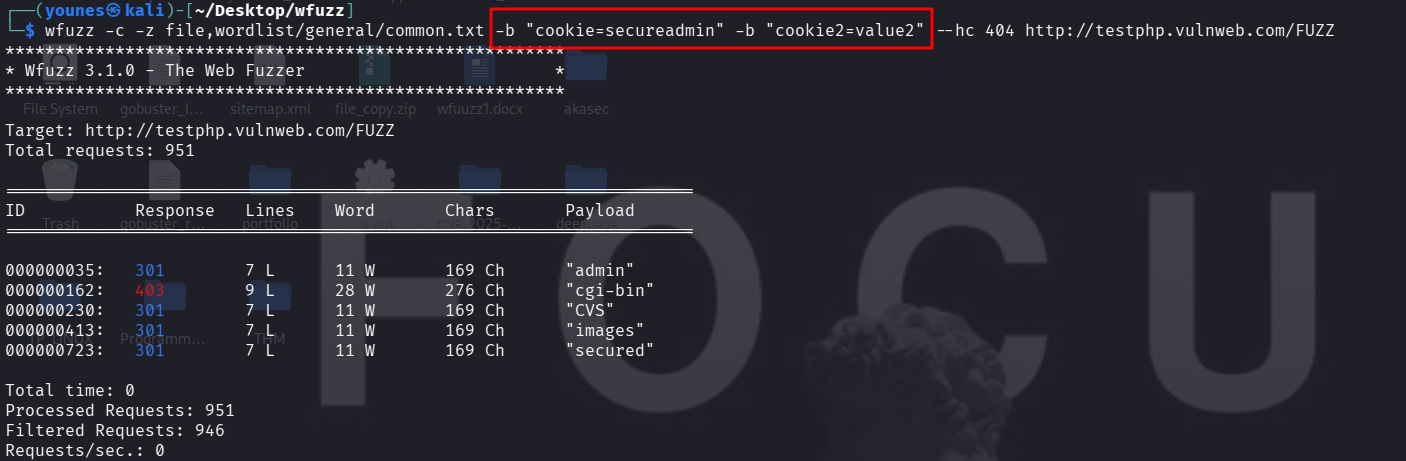
When fuzzing directories or parameters, you can include custom cookies in the HTTP request using the -b option. This is useful for testing scenarios such as cookie poisoning, session hijacking, or privilege escalation, where altering cookie values may reveal different application behavior or privileged content.
Notes
-b "cookie=secureadmin" adds a cookie header with value secureadmin. You can repeat -b to add multiple cookie name/value pairs.
-z file,wordlist/general/common.txt supplies the payloads for FUZZ (here a wordlist).
--hc 404 hides 404 responses to reduce noise.
-c enables colorized output (optional).
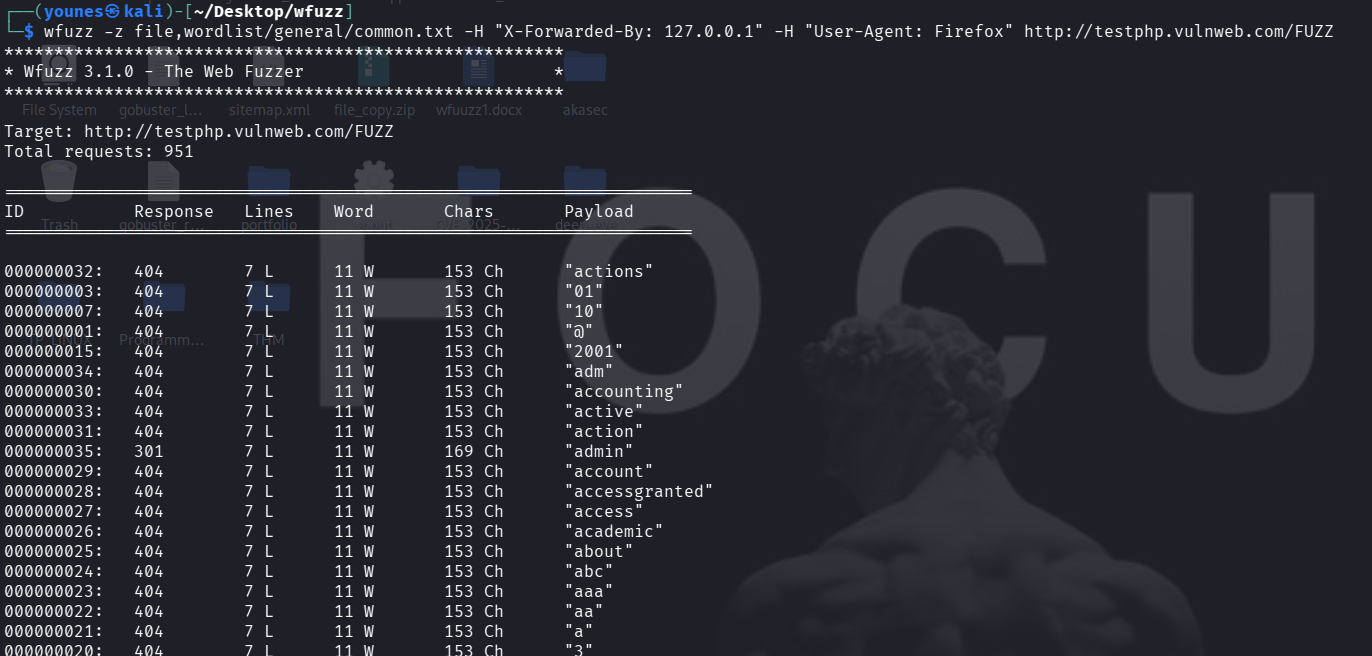
Fuzzing / injecting HTTP headers
You can add or fuzz arbitrary HTTP headers using -H. Repeating -H adds multiple headers. Fuzzing headers can reveal misconfigurations and injection points (Host header injection, header-based access control bypasses, etc.).
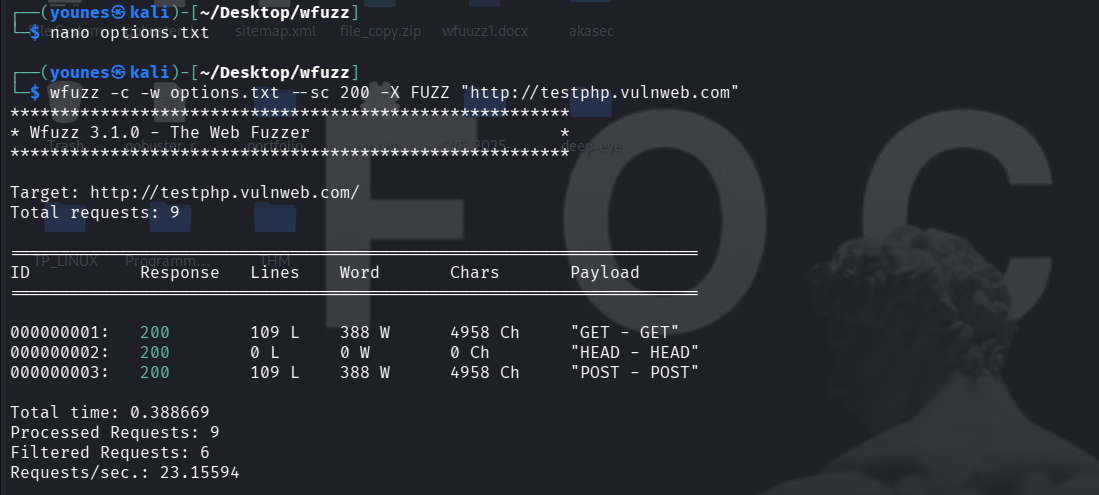
HTTP OPTIONS / Method Fuzzing
Wfuzz can fuzz HTTP methods (verbs) by placing a FUZZ marker in the -X option and supplying a list of methods with -w. This helps detect unusual or misconfigured handlers that accept uncommon methods (for example PUT, TRACE, or PROPFIND) and can reveal exposed functionality or improper access controls.
Example options.txt (one method per line)
GET
HEAD
POST
PUT
DELETE
CONNECT
OPTIONS
TRACE
PATCH
Command (one line — ready to copy/paste)
wfuzz -c -w options.txt --sc 200 -X FUZZ "http://testphp.vulnweb.com"